Two Make.com scenarios, built for the jobs Zapier can't reach.
Make earns its place when a workflow needs branching logic, data staging, or a multi-step API call that a linear tool can't express cleanly. Below are two scenarios: a Xero-to-Asana reporting automation with a two-branch router, and an AI-powered Gmail attachment processor.
1Xero to Asana — Account Transactions Report
The client needed a General Ledger Detail report from Xero attached to a completed Asana task. Xero's API doesn't expose that exact report, so this scenario pulls Account Transactions data for the prior calendar year and reformats it into a CSV that mirrors the manual export.
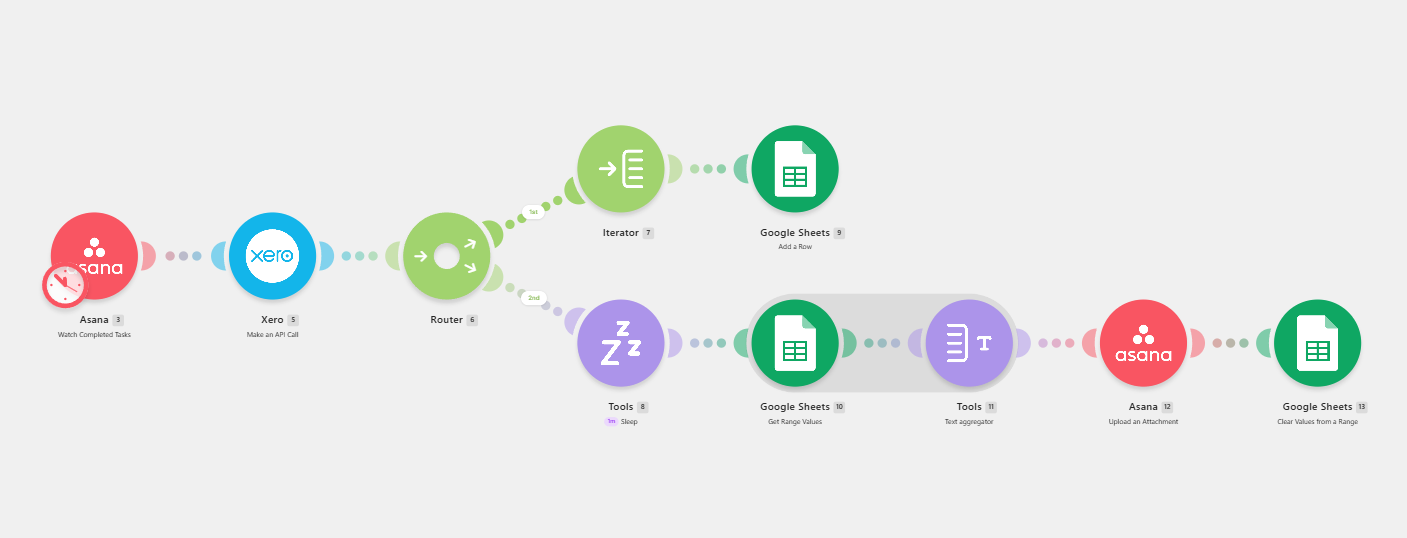
- Trigger — a task is marked complete in the target Asana project.
- Xero API call — pulls Account Transactions data scoped to Jan 1–Dec 31 of the prior year.
- Router, branch 1 — iterates each transaction row and writes it into a Google Sheet as staging.
- Router, branch 2 — waits for staging to finish, reads the rows back, and aggregates them into a CSV-formatted text block.
- Delivery — the CSV is uploaded as an attachment to the completed Asana task, then the staging sheet is cleared for the next run.
2Gmail Attachment AI Processing
Watches Gmail for incoming attachments, uses AI to read the content and generate a descriptive filename, stores the renamed file in Google Drive, logs the activity, and sends a completion notification — replacing manual attachment triage entirely.
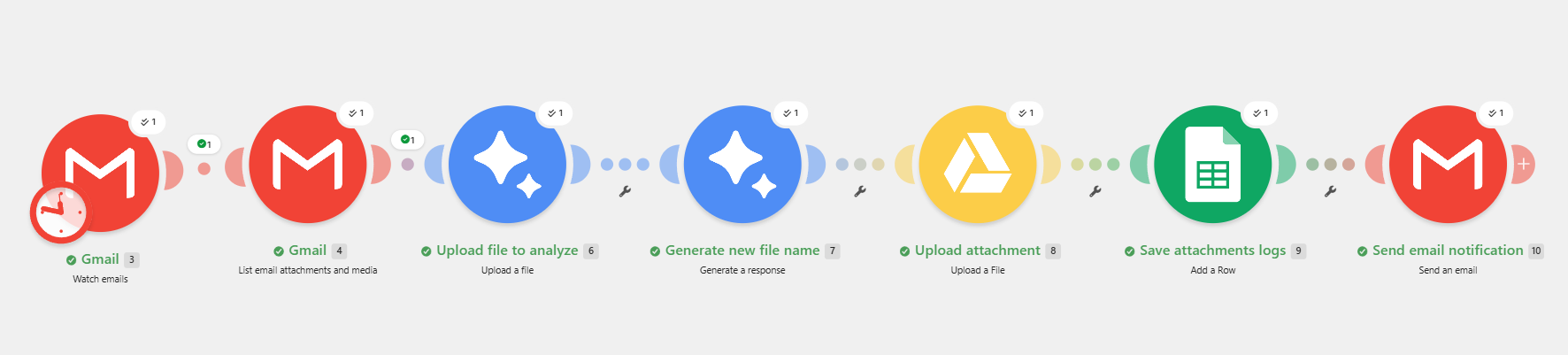
- Trigger — new email detected in the watched Gmail inbox.
- Retrieve — lists the attachments and media on the incoming message.
- AI analysis — uploads the attachment for review, generates a content summary, then a descriptive filename from that summary.
- Store & log — uploads the renamed file to Google Drive and logs the timestamp, original filename, new filename, and file type in Google Sheets.
- Notify — sends an email confirming the attachment has been processed.
If the workflow needs branching, staging, or a multi-step API call, Make handles it cleanly.
We map your actual process on a free call and figure out what's worth automating first.
Book a free call →